ShopDreamUp AI ArtDreamUp
Deviation Actions








Badge Awards
Description
( Actually it's so easy lol. I just painted the brush shape and texture then after defined it I adjusted the setting )
I like this one because I love chalk/pastel effect.
So here I share it to you.
Download from >> "Download File"
It's supposed to work fine for any version of PS since all the settings are basic. I'm currently using PS CS6
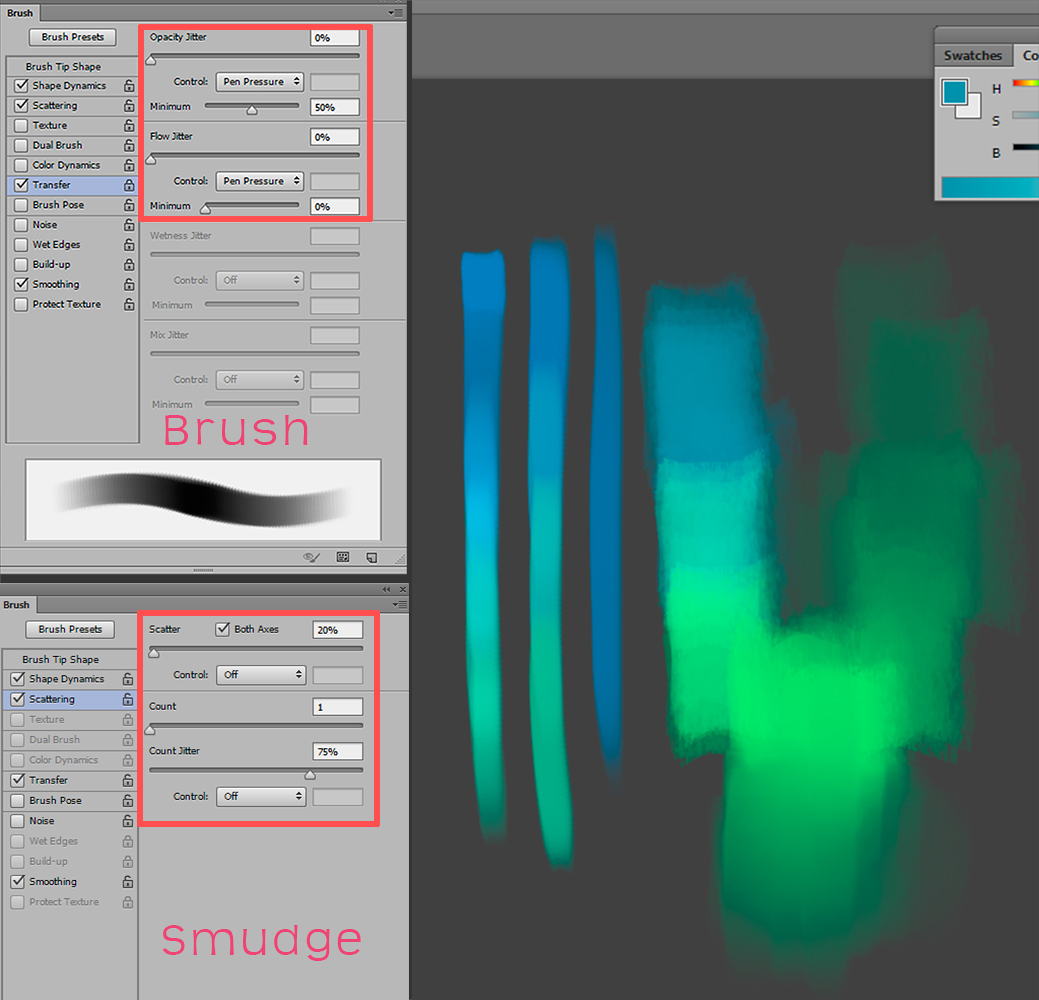
transfer option = other dynamic option
= = = = =
As a brush - You can adjust opacity jitter / flow jitter option as you want or follow from my setting.
You can also play around with texture option and add more effect to it. ( From what you see above I don't add the texture option yet, but it has some texture effect because the brush itself that I painted.)
Make it to soft chalk - At the brush option > Brush Tip Shape > set Spacing lower from 4%-10% and take scattering option off. Then at the Transfer/other dynamic option > Opacity Jitter at the *minimum* % (below controls option ) set to 10-20% instead of 50%

- - - -
As a smudge brush - you can also use this one for smudge tool. Adjust scattering option like the setting from above is what I like the most. You are going to like it too I know!

- - - -
As an eraser - I use as an eraser sometimes
Here are some sample work that I used this brush.
:thumb333495719: :thumb328330696: :thumb326992192: :thumb326131924:
Try it and tell me how do you like.I hope you enjoy using it.
Basic brush set
:thumb320684401:
 My Gallery & Social links
 © 2012 - 2024 Pearlpencil
Comments243
Join the community to add your comment. Already a deviant? Log In
thank you so much<3